Manage field service operations in one system

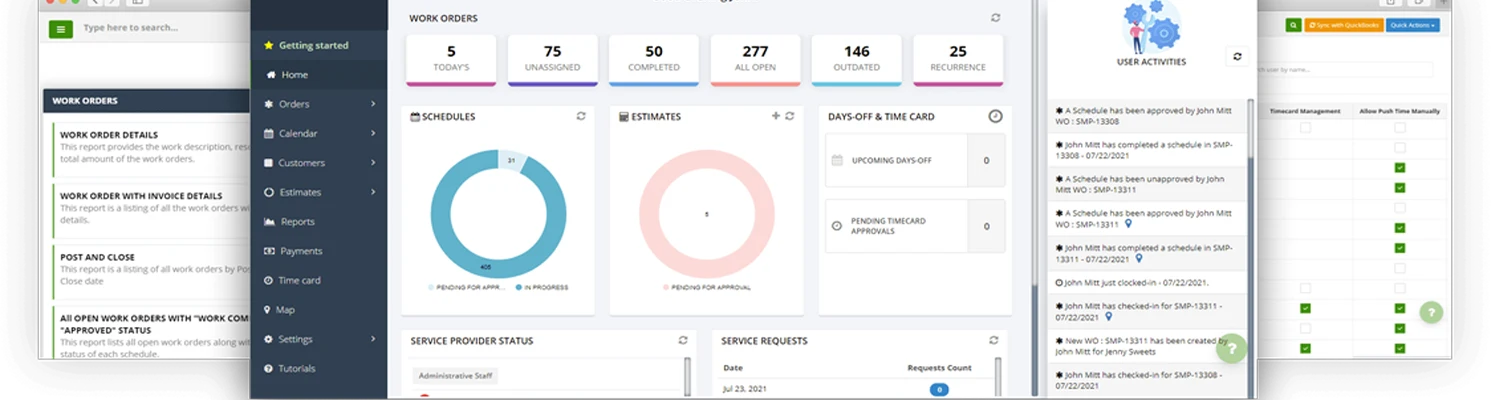
inoday Field Management System helps businesses manage field service operations with better control, clearer visibility, and less manual effort. It is designed for organizations that need to coordinate work orders, technician schedules, maintenance tasks, dispatch, and customer service activities more efficiently.

Field service work often involves multiple teams and changing priorities. Without the right system, it becomes difficult to track jobs, manage resources, and keep service updates current. inoday Field Management System helps solve this by connecting the main parts of field operations in one platform.
Why field management matters

Field service work happens outside the office, but it has a direct impact on service quality, customer satisfaction, and operational performance. When jobs are delayed or technicians are not assigned efficiently, the business can lose time and reduce service quality.

A field management system helps businesses organize service work, improve response times, and maintain better oversight of ongoing tasks. It gives teams the tools they need to manage operations more reliably and reduce the problems that come from manual coordination.

FMS

      Request For Quote

        Request For Demo

          Key business benefits

          BusinessKey-Icon

          Manage service contracts

          Track customer service agreements more effectively and support ongoing service commitments.
          BusinessKey-Icon

          Support preventive maintenance

          Plan recurring maintenance activities to help avoid breakdowns and reduce unplanned downtime.
          BusinessKey-Icon

          Enable mobile field access

          Let field teams update task status, view job details, and record service information from mobile devices while onsite.
          BusinessKey-Icon

          Automate scheduling and dispatch

          Assign jobs based on availability, priority, and service needs. This helps improve planning and reduce delays.
          BusinessKey-Icon

          Increase visibility

          Use dashboards and reports to monitor service activity, review team performance, and identify areas for improvement.
          BusinessKey-Icon

          Keep teams informed

          Send SMS, email, and push notifications for schedule changes, service alerts, and maintenance reminders.
          BusinessKey-Icon

          Improve work order management

          Create, assign, and track service orders through a structured workflow. This helps teams keep jobs organized and reduce missed steps.

          Core features

          shopping-list

          Work order creation

          Create and manage work orders using configurable templates and workflows. This helps standardize service execution and reduce manual work.
          settings

          Preventive maintenance

          Set recurring maintenance schedules to help reduce downtime and improve equipment reliability.
          dashboard

          Dashboards and reports

          Review service metrics through customizable dashboards and reports that support better decision-making.
          Core-features-Img
          schedule

          Scheduling and dispatch

          Automate job scheduling to help assign the right work to the right people at the right time.
          one-time-password

          Mobile access

          Allow technicians to access assigned jobs, update service records, and capture work progress from mobile devices.
          notification

          Notifications and alerts

          Use automated notifications to keep users informed about service updates and schedule changes.

          Why choose inoday

          inoday Field Management System is built for businesses that want a practical way to manage field operations without unnecessary complexity. It helps connect field teams and office teams, improve service control, and support better execution across the service process.

          By bringing work orders, scheduling, maintenance, and reporting into one system, businesses can improve productivity and deliver more consistent service experience.

          Industry Use Cases

          inoday Field Management System is useful for businesses that need reliable coordination of field operations across teams and locations. It supports organizations handling service work, asset maintenance, inspections, repairs, and contract-based field activity.

          It is particularly valuable for:

          Right-icon

          Manufacturing operations.

          Right-icon

          Utility service teams.

          Right-icon

          Facilities management.

          Right-icon

          Equipment maintenance providers.

          Right-icon

          Repair and service organizations.

          Right-icon

          Customer support teams with onsite activities.

          These industries often need better control over technician scheduling, job visibility, and service response times, which makes a field management platform especially useful.

          Industry Use Cases

          Request a demo

          If your business wants to improve scheduling, work order control, maintenance tracking, and field visibility, inoday Field Management System can help.

          FAQ-questions

          FAQ

          1. What is a Field Management System?

          A Field Management System is software used to manage field service operations such as work orders, scheduling, dispatch, maintenance, and service tracking.

          2. Who should use inoday Field Management System?

          It is useful for businesses that manage field technicians, maintenance teams, service contracts, and onsite operations.

          3. Does it support preventive maintenance?

          Yes. The system supports recurring maintenance scheduling to help reduce downtime and improve equipment reliability.

          4. Can field teams use it on mobile devices?

          Yes. Mobile access helps field teams update tasks, view service details, and record progress while onsite.

          5. Can it improve scheduling?

          Yes. The system supports automated scheduling and dispatch to help improve planning and service coordination.